IPTV op Samsung Smart TV Installeren: Gids 2026
June 15, 2026

Tio 10 Beste IPTV Aanbieder
June 15, 2026

Hotplayer App Installatiegids (2026) – Premium Dutch IPTV
Overzicht:
De Hotplayer App is een veelzijdige en moderne IPTV speler die beschikbaar is op bijna alle apparaten. Let op: de app bevat geen tv-kanalen, je hebt altijd een eigen M3U-playlist of Xtream Codes API nodig.
Hotplayer werkt op Samsung Smart TV, LG TV, Android, Android TV, Firestick, Windows, iOS/macOS en Roku.
With this Premium Dutch IPTV manual, you will learn step by step how to install the app and easily activate your IPTV subscription.
Alles wat je Wilt Kijken, in 1 Premium 4K IPTV Nederland Pakket
Live sport, Formule 1, Nederlandse zenders, films, documentaires en kinderkanalen
- 42,000+ live channels uit 120+ landen in 4K
- 125,000+ movies & TV shows: Netflix, Videoland, prime video...
- Premium sportzenders: Formule 1, PDC Darts, grote voetbalwedstrijden
- All Dutch channels: NPO, RTL, SBS 6, Veronica, regionale zenders
- Directe activatie in 5 minuten : 7 dagen/week
- Gratis IPTV test beschikbaar zonder creditcard
Installation per device
Samsung Smart TV:
- Open the Samsung App Store.
- Zoek naar Hotplayer.
- Install the app and launch it.
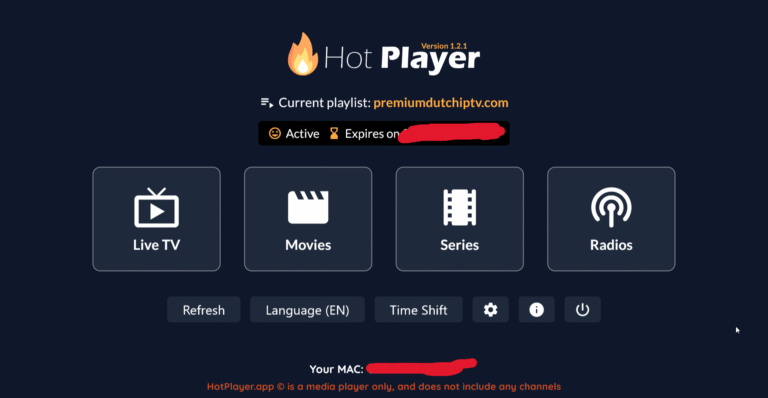
- You will immediately see your MAC address on the screen.
LG Smart TV (WebOS):
- Open the LG Content Store.
- Zoek naar Hotplayer App.
- Download and install.
- Start the app and note down your MAC address.
Android & Android TV:
- Open the Google Play Store.
- Zoek naar Hotplayer App en installeer.
- Start the app and you will immediately see your MAC address / device code.
- 👉 Direct link: Hotplayer in Google Play
Fire TV & Fire Stick:
- Install the app via Downloader or the Amazon App Store (if available:
). - Go to Settings > My Fire TV > Developer Options.
- Enable Apps from unknown sources.
- Download en installeer de Hotplayer APK.
- Start the app and note down your MAC address.
Windows / PC:
- Visit the official website or the Microsoft Store.
- Download en installeer de Hotplayer App.
- Start the app and note down your apparaatcode / MAC-adres.
iOS & macOS (iPhone, iPad, MacBook) :
- Open the App Store.
- Zoek naar Hotplayer App en installeer.
- Launch the app to get started. MAC address te zien.
Roku :
- Open the Roku Channel Store.
- Zoek naar Hotplayer en installeer.
- Start the app and your device code will appear.
Link playlist to Hot Player App
1. Go to the official Hot Player upload/activation portal: hotplayer.app.
2. Enter your MAC address.
3. Add your M3U link or Xtream Codes API.
4. Confirm and activate.
5. Return to the app and click Refresh/Reload.
Important tips
- Hot Player is alleen een IPTV speler – er worden geen zenders meegeleverd.
- You need a valid IPTV subscription or M3U link.
- Always write down your MAC address and device key.
- If you encounter problems: restart the app or upload the playlist again.
- For support, please contact us at:
📧 contact[at]premiumdutchiptv.nl
Conclusion
De Hotplayer App is een van de best IPTV spelers in Nederland voor wie zoekt naar flexibiliteit en compatibiliteit. Met ondersteuning voor bijna alle apparaten is het de ideale oplossing om jouw Dutch IPTV subscription van Premium Netherlands IPTV probleemloos te gebruiken.