Met de Smart IPTV app (SIPTV) kun je eenvoudig IPTV streams afspelen op vrijwel alle Smart TV’s, ongeacht het merk. Of je nu een LG, Samsung of Sony hebt, deze applicatie werkt perfect. Met Smart IPTV bekijk je je favoriete Dutch IPTV kanalen rechtstreeks op je televisie.
Smart IPTV is één van de meest gebruikte applicaties voor het streamen van IPTV channels op Smart TV’s. De app biedt een gebruiksvriendelijke interface en wordt regelmatig geüpdatet. Alles wat je nodig hebt is een Smart TV en een stabiele internetverbinding.
The app also supports EPG, Picons, and channel groups, provided you upload an M3U file or URL that contains these options.
Important: de applicatie bevat zelf geen kanalen. Je moet je eigen IPTV Nederland Nederland toevoegen via een provider zoals Premium Dutch IPTV.
Important notes
Gratis proefperiode: bij de eerste installatie krijg je 7 dagen gratis toegang. Daarna kun je de app activeren via een in-app betaling van €5,49 of via de officiële portal: siptv.eu/activation .
Geen kanalen inbegrepen: Smart IPTV levert geen content (zoals tv-kanalen of films). Je hebt een geldig IPTV Nederland nodig, bijvoorbeeld via Premium IPTV Nederland.
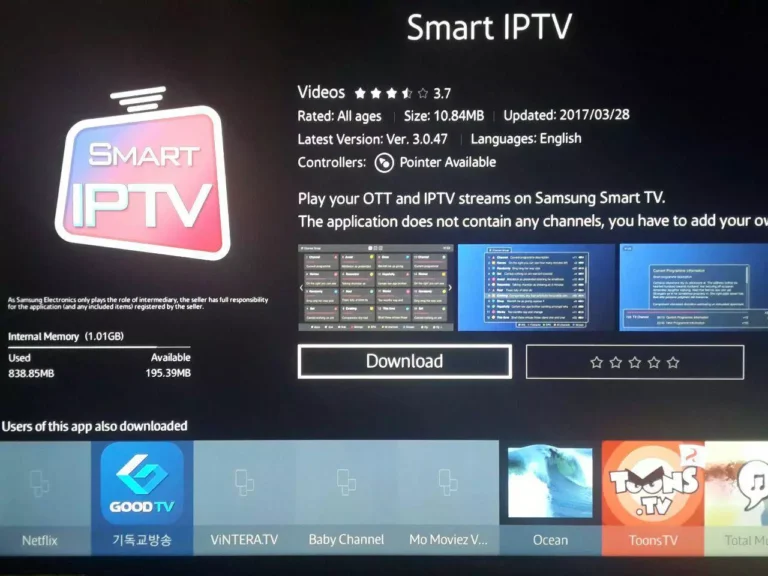
Step 1: Download Smart IPTV
Download the Smart IPTV app from your television's official app store.
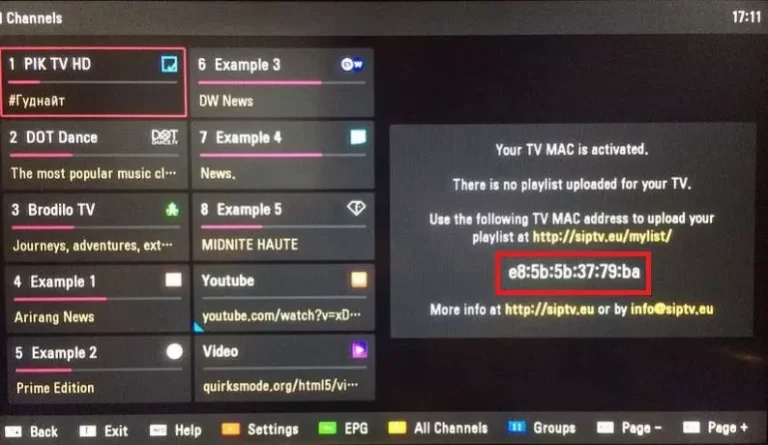
Step 2: Find your Smart IPTV MAC address
After installation, open the app. The MAC address of your Smart TV will appear on the screen. You will need this for activation.
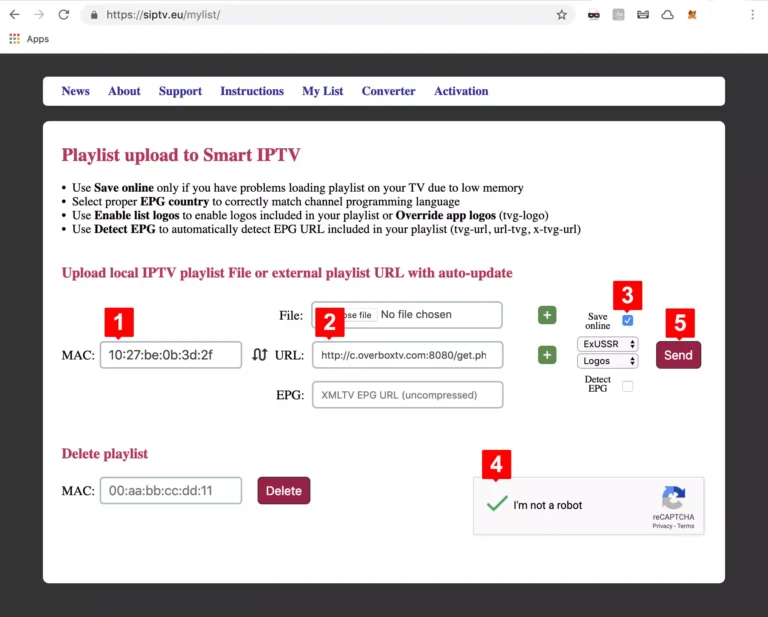
Vul de M3U-link in die je van je Premium Dutch IPTV abonnement hebt ontvangen.
Vink Save online aan. Dit is handig wanneer je een oudere TV hebt met minder RAM, omdat M3U-lijsten vaak zwaar zijn.
Activate the captcha and click Send.
You can now enjoy IPTV Netherlands on your Smart TV with Smart IPTV.
Frequently asked questions (FAQ)
I can't find my MAC address?
Ga naar de instellingen van de Smart IPTV-app (onderaan zie je een gidsbalk, meestal via de rode knop). Daar vind je je MAC-ID.
My channel list is not loading or is displaying an error message?
Dit komt vaak voor bij zeer grote M3U-lijsten met duizenden kanalen en VOD.
Oplossing: verklein je playlist en upload opnieuw. Met je IPTV dashboard kun je ongewenste kanalen en VOD-bouquets verwijderen.
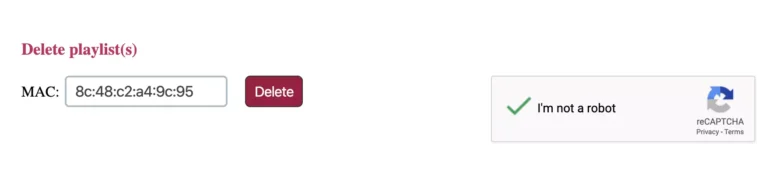
How do I delete an expired listing?
Go to siptv.eu/mylist, enter your MAC address in Delete, activate the captcha (I am not a robot), and click Delete.
🎉 Exclusive discount at Premium Dutch IPTV:
Don't miss this opportunity! Choose your IPTV subscription for the Netherlands (1, 3, 6, or 12 months) and take advantage of special discounts now. ✔ Reliable service ✔ 24/7 support ✔ Best IPTV Netherlands experience